In tech communities, how we respond matters just as much as what we know. This post explores how certain types of replies, even well-intentioned ones, can unintentionally shut down dialogue.
As a Microsoft MVP, a big part of my role that I lean into is providing guidance in the community around better practices implementing Microsoft 365 and help navigating the constantly shifting landscape. One of the benefits of this award is access to the Microsoft Product Team under a Non-Disclosure Agreement where they share the roadmap of what is coming to help us guide our customers as well as give us the opportunity to provide real-world feedback. When we are providing guidance to the community, we will be interacting with a wide spectrum of technical experience and readiness. I firmly believe as a community it is our job to make that as welcoming as possible. We all started as the same step 1, though we may have begun our journeys at different times.
A consistent trend I have seen in technical discourse, that is only growing as algorithms rule our world of what is seen and heard, is that initial, open-ended conversations which are aimed at exploration or collaborative problem-solving are prematurely curtailed by individuals who interject with highly technical commentary. While these contributions may appear insightful, they often serve more to assert intellectual dominance than to foster dialogue. The result is a subtle form of conversational gatekeeping, where the emphasis shifts from shared learning to performative expertise, ultimately stifling broader participation and idea exchange.
How does this look in the real world?
To illustrate how this dynamic plays out I wanted to share an example I recently saw on LinkedIn, (removing the MVP Author and MVP Commenter names for privacy):
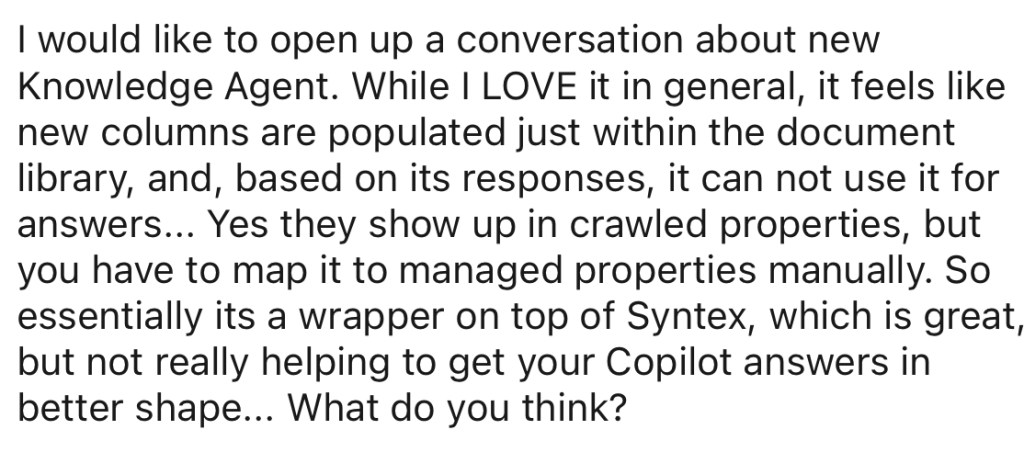
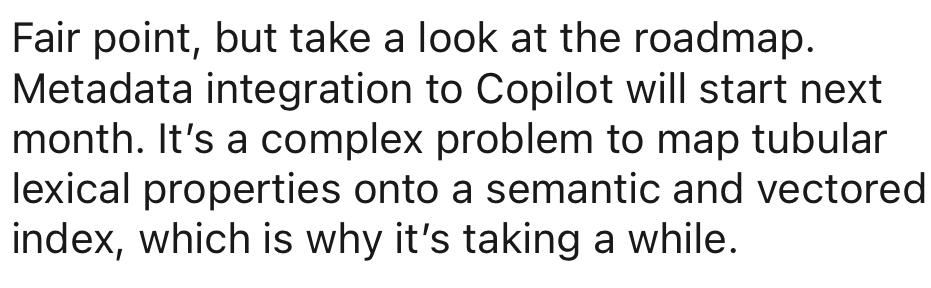
What I love about this post is the author is actively inviting a dialogue (“I would like to open up a conversation about [topic]”) then continues to share their experiences, highlighting both enthusiasm and areas of uncertainty, in a way that is accessible to a wide range of technical audiences. They end with an invitation to join the conversation (“What do you think?”). Many replies engage in this dialogue and create a robust conversation around the topic. One commenter takes a different approach which shuts down instead of fosters the conversation:
The missteps
Dismissive framing
The opening redirects away from the author’s experience and redirects to an authoritative source- implying the author has not seen it, has not considered it, and/or their experience is irrelevant (remember that NDA I mentioned for MVPs?).
Overly technical language
“Tubular lexical properties onto a semantic vectored index…”
This kind of jargon, while possibly accurate, is inaccessible to many readers and shifts the tone from collaborative to performative. It’s a subtle way of saying, “This is too complex for general discussion.” While it signals expertise, it doesn’t invite others, especially those newer to the space, to engage. This undermines (my interpretation of) the author’s intention, and, from my perspective, the role MVPs play in making this technology more accessible.
So, what can I do to foster conversation?
Let’s explore how this kind of reply could be more inclusive and constructive. Instead of shutting down the conversation, the reply could have:
Acknowledged the author’s insights: “You raise a great point about [topic]”. Active listening in conversations ensures both parties are heard and understood.
Shared the roadmap information as a resource: “That is a great observation-I saw on Roadmap ID #### we have [feature] coming on [date]” to continue the public knowledge sharing and dialogue as the author intended.
Invited further discussion: “Do you think [workaround] will still be needed even after this update?”
Let’s try another example
In our second LinkedIn exchange on the same topic, an Author expresses a valid concern:

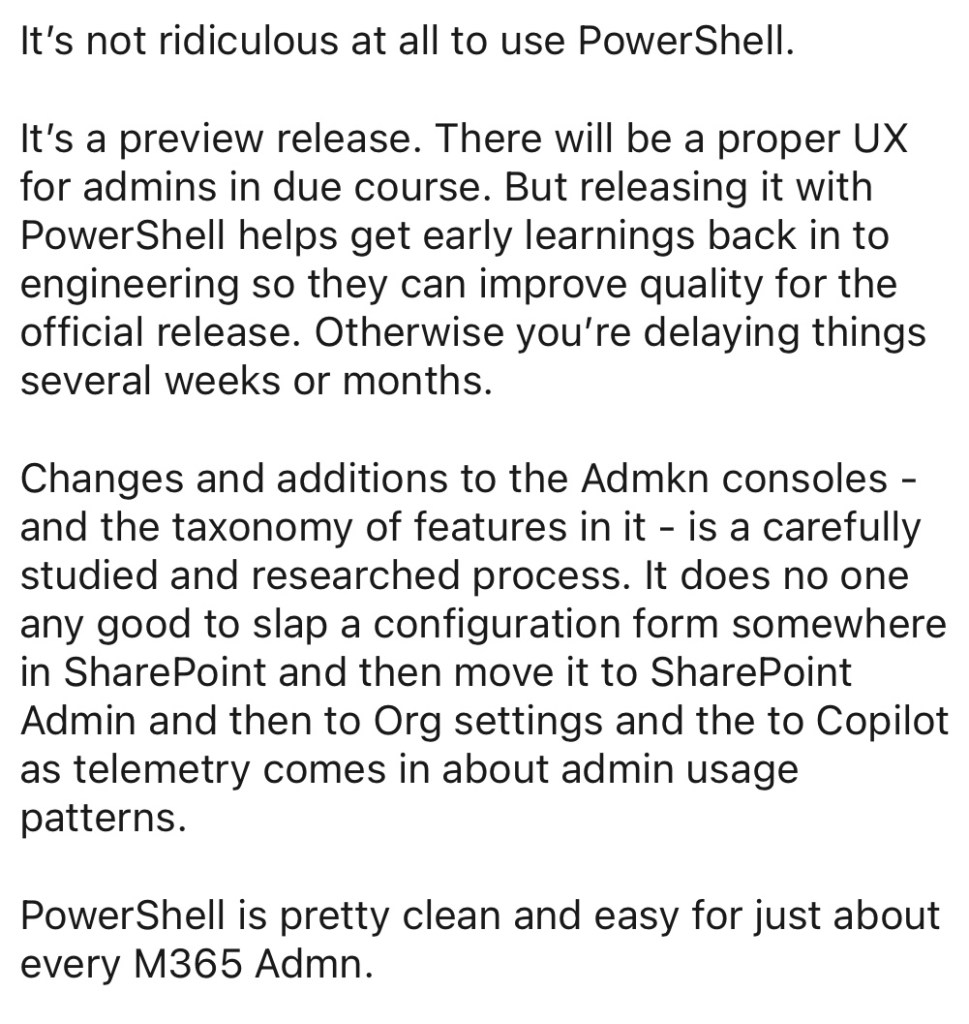
The summarized concern: why is an AI-powered product like Knowledge Agent relying on PowerShell for provisioning and management during preview? The author calls it “ridiculous” and advocates for a more user-friendly experience which a fair critique, especially from a usability standpoint (high maintenance & fragility, hidden dependencies & complexities… but that is an entirely different blog post)
The reply, however, shifts the tone:
The missteps
Defensive language
It begins by refuting the author’s opinion rather than engaging with it: “It’s not ridiculous.” This sets a defensive tone and positions the commenter as correcting, with assumed authority to do so, rather than collaborating.
Redirecting instead of relating
The reply redirects the conversation away from usability to technical justification explaining why PowerShell is used in preview phases. While this may be valid from an engineering standpoint, it fails to engage with the core concern: usability and accessibility for non-technical users.
Dismissive framing
The comment ends with a blanket statement: “PowerShell is clean and easy for M365 admins.” While this may be true for an arguably small percentage of the subset of users in Microsoft 365, it dismisses the broader reality: most small to medium-sized businesses, especially those without dedicated IT staff, do not have a technical M365 admin available to support PowerShell provisioning. These are the exact organization, in my experience, who stand to benefit most from AI-powered tools like Knowledge Agent, as they are so often doing more with less, yet they’re effectively excluded from early adoption and the opportunity to provide feedback.
What are the missed opportunities here?
Instead of defending the technical choice, the commenter could have:
Acknowledging the concern: “You raise a good point that PowerShell isn’t intuitive for everyone.” Preview features should invite feedback from diverse users, not just technical admins. Requiring PowerShell narrows the pool of testers and skews feedback toward a subset of organizations using this technology which is now likely larger organizations with more technical support and readiness. This does not seem aligned with Microsoft’s mission statement “To empower every person and every organization on the planet to achieve more.”
Sharing context constructively: “In preview phases, PowerShell helps Microsoft gather feedback quickly before building UI.”
User experience as a primary concern: Let me say this again for the folks in the back: user experience is not a secondary concern. It’s the first concern if you want people to actually use what you’ve built.
Even the most powerful features will go unused if the barrier to entry is too high. And in the Microsoft 365 ecosystem, this happens more often than we’d like to admit. Take Organization Asset Libraries as an example. This feature has been around for quite some time, allowing companies to surface branded templates directly in Word and PowerPoint desktop apps. Imagine this: company letterhead, branded slide decks, and other assets available right where people work.
Every time I mention this in a conference session, I get surprised reactions. Why? Because setting it up requires PowerShell. For many small to medium-sized businesses, that’s a dealbreaker. They don’t have a dedicated M365 admin or the technical capacity to run scripts. Instead of leveraging built-in tools, they’re stuck manually emailing templates, policing usage, and watching brand consistency fall apart.
This isn’t just a missed opportunity… it’s a usability failure. The feature exists, the value is clear, and the friction is far too high. If we want adoption, we need to meet users where they are and not where we assume they should be.
Creating a constructive dialogue: Dismissive replies reinforce exclusion. When someone raises a usability concern and the response is “you’re wrong, it’s easy,” it sends a message: this space isn’t for you. While this may not be their intention, it might be the result for that author, and anyone else interested in engaging with the thread.
Using some of these approaches could have transformed a potentially polarizing exchange into a collaborative one, modeling the kind of inclusive, growth-minded dialogue we want to see more of in the Microsoft community.
I’m still learning how to foster better conversations myself and these examples helped me reflect on how we can all do better together. What do you all think? What else should be on the list? I’d love to hear your thoughts, especially on how we can make technical spaces more welcoming and collaborative.
Until next time… let’s save our flexing for the gym – not the comments section 💪💪
 Emily Mancini